optimism
Enhanced DA Throttling Mechanisms
The op-batcher includes sophisticated throttling mechanisms to manage data availability (DA) backlogs and prevent excessive costs during high-load periods. These mechanisms dynamically adjust block building constraints based on current DA load.
Overview
Data availability throttling addresses situations where transaction volume exceeds the DA layer’s throughput capacity. Without throttling, this can lead to:
- Large backlogs of pending data
- Significant delays between transaction submission and DA posting
- Substantial cost overruns when DA prices spike during posting
- Degraded user experience due to delayed transaction finalization
The throttling system prevents these issues by instructing sequencers to limit block data production when backlogs exceed configured thresholds.
Throttling Controller Types
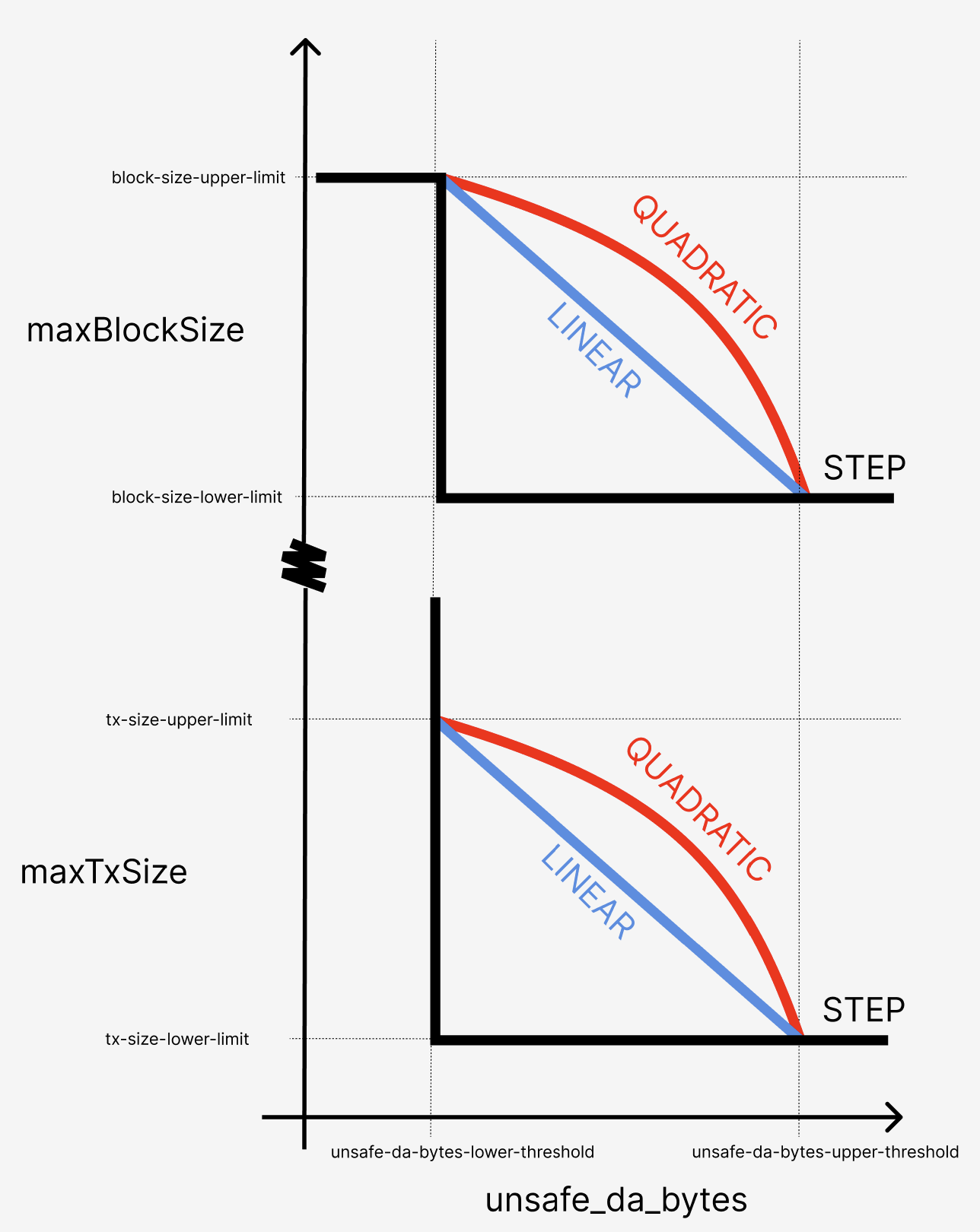
The batcher supports four throttling strategies, each with different response characteristics. The strategies can be understood in this
diagram:
-
Each strategy responds to the
unsafe_da_bytesmetric and corresponding thresholdsthrottle.unsafe-da-bytes-lower/upper-threshold, and results a throttling “intensity” between 0 and 1. -
This intensity is then mapped to a maximum tx size and maximum block size to control the
miner_setMaxDASize(maxTxSize, maxBlockSize)API calls made to block builders, depending on the configuration variables shown in the diagram above. -
When the throttling intensity is zero (the
unsafe_da_bytesis less thanunsafe-da-bytes-lower-threshold), blocks will continue to be limited atthrottle.block-size-upper-limit, whereas transactions are not throttled at all (by usingmaxTxSize=0).
NOTE Be aware that using
0for eitherthrottle.block-size-lower-limitandthrottle.tx-size-lower-limitresults in no throttling limits being applied (for blocks and transactions respectively).
Step Controller (Default)
Behavior: Binary on/off throttling
- Below threshold: No throttling applied
- Above threshold: Maximum throttling applied immediately
- Use case: Simple, predictable throttling behavior
- Best for: Environments requiring clear, binary throttling states
[!WARNING] If selecting the step controller, you should not rely on default throttling parameters as this could cause too much throttling to be applied too quickly.
Linear Controller
Behavior: Linear scaling throttling intensity
- Response curve: Gradual increase from threshold to maximum threshold
- Scaling: Throttling intensity = (current_load - threshold) / (max_threshold - threshold)
- Use case: Moderate, proportional response to load increases
- Best for: Steady load patterns with predictable growth
Quadratic Controller
Behavior: Quadratic scaling throttling intensity
- Low overload: Gentle throttling response
- High overload: Aggressive throttling response
- Scaling: More tolerant of brief spikes, strong response to sustained overload
- Use case: Environments with occasional spikes but need strong protection against sustained overload
- Best for: Variable load patterns with tolerance for brief excursions
PID Controller (⚠️ EXPERIMENTAL)
PID Controller is a control mechanism that automatically adjusts the batcher’s throttling intensity output to maintain a desired load.
Behavior: Proportional-Integral-Derivative control
- Proportional: Immediate response to current error
- Integral: Corrects for accumulated error over time
- Derivative: Anticipates future error based on current rate of change
- Use case: Complex load patterns requiring precise control and minimal overshoot
- Best for: Expert users with control theory knowledge
⚠️ EXPERIMENTAL FEATURE WARNING
The PID controller is experimental and should only be used by users with deep understanding of control theory. Improper configuration can lead to system instability, oscillations, or poor performance. Use at your own risk and only with extensive testing.
Runtime Management via RPC
The batcher exposes admin RPC endpoints for dynamic throttling control without restarts:
Get Controller Status
curl -X POST -H "Content-Type: application/json" \
  --data '{"jsonrpc":"2.0","method":"admin_getThrottleController","params":[],"id":1}' \
  http://localhost:8545
Response:
{
  "jsonrpc": "2.0",
  "result": {
    "type": "quadratic",
    "threshold": 1000000,
    "current_load": 750000,
    "intensity": 0.25,
    "max_tx_size": 128000,
    "max_block_size": 1500000
  },
  "id": 1
}
Switch Controller Type
Step Controller:
curl -X POST -H "Content-Type: application/json" \
  --data '{"jsonrpc":"2.0","method":"admin_setThrottleController","params":["step", null],"id":1}' \
  http://localhost:8545
Linear Controller:
curl -X POST -H "Content-Type: application/json" \
  --data '{"jsonrpc":"2.0","method":"admin_setThrottleController","params":["linear", null],"id":1}' \
  http://localhost:8545
Quadratic Controller:
curl -X POST -H "Content-Type: application/json" \
  --data '{"jsonrpc":"2.0","method":"admin_setThrottleController","params":["quadratic", null],"id":1}' \
  http://localhost:8545
PID Controller:
curl -X POST -H "Content-Type: application/json" \
  --data '{"jsonrpc":"2.0","method":"admin_setThrottleController","params":["pid", {"kp": 0.3, "ki": 0.15, "kd": 0.08, "integral_max": 50.0, "output_max": 1.0, "sample_time": "5s"}],"id":1}' \
  http://localhost:8545
Reset Controller State
curl -X POST -H "Content-Type: application/json" \
  --data '{"jsonrpc":"2.0","method":"admin_resetThrottleController","params":[],"id":1}' \
  http://localhost:8545
PID Controller Configuration
Parameters
The PID controller uses six key parameters:
Core PID Parameters:
kp(Proportional Gain): Controls immediate response to current error- Higher values: Faster response but may cause overshoot
- Lower values: Slower response but more stable
ki(Integral Gain): Controls response to accumulated error over time- Higher values: Faster elimination of steady-state error
- Lower values: Slower correction but less prone to oscillation
kd(Derivative Gain): Controls response to rate of error change- Higher values: Better anticipation of future error
- Lower values: Less noise sensitivity but slower prediction
Protection Parameters:
integral_max: Maximum accumulated integral to prevent windupoutput_max: Maximum controller output (typically 1.0)sample_time: Controller update frequency (nanoseconds, e.g., 5000000000 = 5ms)
Predefined Profiles
⚠️ EXPERIMENTAL: These profiles are starting points only. Proper tuning requires understanding your specific system characteristics and extensive testing.
Gentle Throttling (Conservative, stable):
{
  "kp": 0.1,
  "ki": 0.05,
  "kd": 0.02,
  "integral_max": 1000.0,
  "output_max": 1.0,
  "sample_time": "10s"
}
- Slow, stable response
- Minimal overshoot
- Good for predictable loads
Balanced Throttling (Recommended default):
{
  "kp": 0.3,
  "ki": 0.15,
  "kd": 0.08,
  "integral_max": 1000.0,
  "output_max": 1.0,
  "sample_time": "2s"
}
- Balanced responsiveness and stability
- General-purpose throttling
- Good starting point for most scenarios
Aggressive Throttling (Fast response, may overshoot):
{
  "kp": 0.8,
  "ki": 0.4,
  "kd": 0.2,
  "integral_max": 2000.0,
  "output_max": 1.0,
  "sample_time": "2s"
}
- Fast response to load changes
- Good for highly variable loads
- May overshoot and oscillate
Tuning Guidelines
⚠️ WARNING: PID tuning requires expertise. Improper tuning can cause instability.
- Start Conservative: Begin with gentle settings and gradually increase responsiveness
- Tune One Parameter at a Time: Change kp first, then ki, then kd
- Monitor System Response: Watch for oscillations, overshoot, and stability
- Test Under Load: Validate behavior under various load conditions
- Have Rollback Plan: Be prepared to switch back to step/linear controllers
Basic Tuning Process:
- Set ki=0, kd=0, start with small kp (0.1)
- Increase kp until system responds adequately without overshoot
- Add small ki (0.05) to eliminate steady-state error
- Add small kd (0.02) to improve transient response
- Adjust integral_max to prevent windup
- Fine-tune based on observed behavior
Throttling Operation
How It Works
- Monitoring: Batcher continuously monitors pending DA bytes in its queue
- Threshold Checking: Compares current load against configured threshold
- Intensity Calculation: Controller calculates throttling intensity (0.0 to 1.0)
- Parameter Mapping: Intensity maps to specific tx/block size limits
- Endpoint Updates: Sends
miner_setMaxDASizeRPC calls to configured endpoints - Enforcement: Sequencers/builders enforce the limits during block construction
Endpoint Communication
The throttling system communicates with multiple endpoints in parallel:
- Primary sequencer endpoints: Configured via
--l2-eth-rpc - Additional endpoints: Configured via
--additional-throttling-endpoints - Builder endpoints: In rollup-boost setups, builders receive throttling signals
Each endpoint runs in its own goroutine with:
- Retry logic: Automatic retries for failed RPC calls
- Error handling: Graceful handling of unavailable endpoints
- Parallel updates: All endpoints updated simultaneously
Metrics and Monitoring
The batcher exposes Prometheus metrics for throttling monitoring:
op_batcher_throttle_intensity: Current throttling intensity (0.0-1.0)op_batcher_throttle_pending_bytes: Current pending DA bytesop_batcher_throttle_max_tx_size: Current max transaction size limitop_batcher_throttle_max_block_size: Current max block size limitop_batcher_throttle_controller_type: Current controller typeop_batcher_throttle_pid_error: PID controller error term (PID only)op_batcher_throttle_pid_integral: PID controller integral term (PID only)op_batcher_throttle_pid_derivative: PID controller derivative term (PID only)
Best Practices
Controller Selection
Use Step Controller when:
- Simple, predictable behavior is required
- Binary throttling states are acceptable
- Minimal configuration complexity is desired
Use Linear Controller when:
- Gradual response to load changes is preferred
- Load patterns are relatively steady
- Proportional throttling is sufficient
Use Quadratic Controller when:
- Tolerance for brief load spikes is needed
- Strong protection against sustained overload is required
- Variable load patterns are common
Use PID Controller when:
- Expert control theory knowledge is available
- Complex load patterns require sophisticated control
- Extensive testing and tuning resources are available
- Experimental features are acceptable
General Recommendations
- Start Simple: Begin with step or linear controllers
- Monitor Closely: Watch metrics and system behavior
- Test Thoroughly: Validate under various load conditions
- Plan for Failure: Have fallback controllers configured
- Document Changes: Record configuration changes and their effects
- Regular Review: Periodically assess controller performance
Common Pitfalls
- Over-tuning: Making too many adjustments too quickly
- Ignoring Metrics: Not monitoring system response to changes
- Production Testing: Testing new controllers directly in production
- Parameter Copying: Using other systems’ PID parameters without validation
- Insufficient Monitoring: Not tracking key performance indicators
Troubleshooting
Common Issues
Controller Not Responding:
- Check RPC connectivity to endpoints
- Verify
miner_setMaxDASizemethod availability - Confirm threshold configuration is correct
Oscillating Behavior (PID):
- Reduce proportional gain (kp)
- Decrease derivative gain (kd)
- Increase sample time
- Check for noise in load measurements
Slow Response:
- Increase proportional gain (kp)
- Decrease sample time
- Check threshold multiplier settings
High Error Rates:
- Verify endpoint availability
- Check network connectivity
- Review retry logic configuration
Diagnostic Commands
Check controller status:
curl -s -X POST -H "Content-Type: application/json" \
  --data '{"jsonrpc":"2.0","method":"admin_getThrottleController","params":[],"id":1}' \
  http://localhost:8545 | jq
Reset and start fresh:
curl -X POST -H "Content-Type: application/json" \
  --data '{"jsonrpc":"2.0","method":"admin_resetThrottleController","params":[],"id":1}' \
  http://localhost:8545
Switch to safe mode (step controller):
curl -X POST -H "Content-Type: application/json" \
  --data '{"jsonrpc":"2.0","method":"admin_setThrottleController","params":["step", null],"id":1}' \
  http://localhost:8545